> For the complete documentation index, see [llms.txt](https://docs.shoppego.my/tutorials/llms.txt). Markdown versions of documentation pages are available by appending `.md` to page URLs; this page is available as [Markdown](https://docs.shoppego.my/tutorials/en/marketing/bump-offers.md).
# Bump Offers
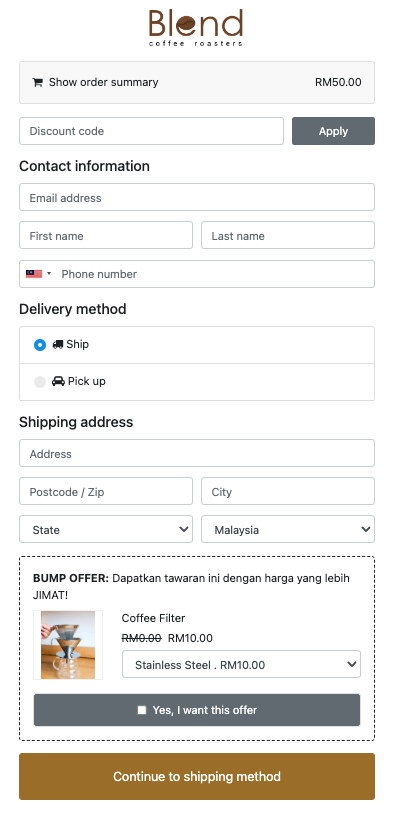
**Bump Offers** is a function of Shoppego under marketing to increase the conversion rate of your online store. In simple language, it is to be **cross-sold** to buyers.
{% hint style="success" %}
These features are only available for **Premium** and **Ultimate**** plan** only.
{% endhint %}
The order bump will be **displayed on the Checkout section** which is when the buyer fills in the information for delivery.
## Examples of bump offers in Shoppego:
## Setup Bump Offer
1. Log in to Shoppego dashboard click on the **Marketings** -> **Bump Offers**

2. Click on the **Create bump offer** button.
Field
Description
Name
Name of the bump you want to create.
Title
Headline that can attract the buyer's attention.
Products Offer
Place the product to upsell in this section.
3. You can **place as many products** in this section and they will be **displayed randomly** to your buyers.
4. Next, click the **Save** button

The process of creating a Bump offer is complete. Good luck!