> For the complete documentation index, see [llms.txt](https://docs.shoppego.my/tutorials/llms.txt). Markdown versions of documentation pages are available by appending `.md` to page URLs; this page is available as [Markdown](https://docs.shoppego.my/tutorials/en/online-store/preferences.md).
# Preferences
## Homepage Title
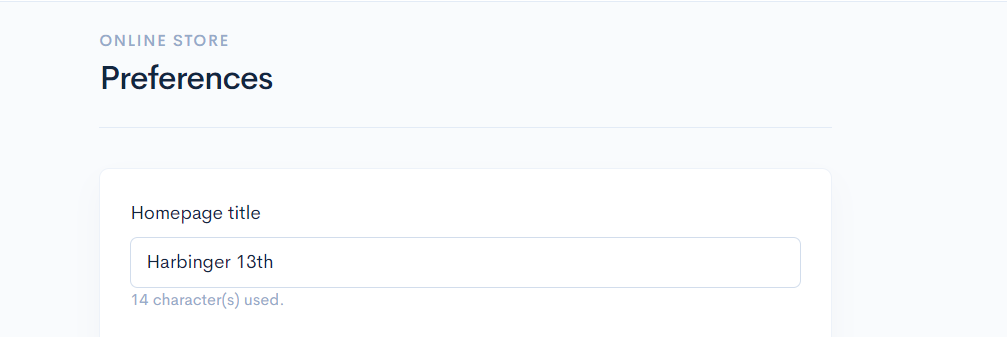
1. To change the Homepage Title name, you can go to:
**Dashboard Overview -> Online Stores -> Preferences -> Homepage Title.**
2. After making the changes, make sure to click the **Save** button and check if the changes have taken effect on your website. You can refer to the image below.
## Homepage Display
To set up Homepage Display, please refer to the tutorial below:
{% content-ref url="/pages/uwyLbXrgWzYYlx1ukomJ" %}
[Set page as Homepage](/tutorials/en/online-store/pages/set-page-as-homepage.md)
{% endcontent-ref %}
## Featured Category
To set up Featured Category, please refer to the tutorial below:
{% content-ref url="/pages/cQ8nkRogposfnfLnMjcw" %}
[Featured Category](/tutorials/en/products/categories/featured-category.md)
{% endcontent-ref %}
## Facebook Pixel
To set up Facebook Pixel, please refer to the tutorial below:
{% content-ref url="/pages/yZoQTovi6nQuiEYwjHvH" %}
[Facebook Pixel](/tutorials/en/integration/tracking-and-analytics/facebook/facebook-pixel.md)
{% endcontent-ref %}
## Tiktok Pixel
To set up Tiktok Pixel, please refer to the tutorial below:
{% content-ref url="/pages/eJzTVErObeCY1Tdns0Xl" %}
[TikTok Pixel](/tutorials/en/integration/tracking-and-analytics/tiktok/tiktok-pixel.md)
{% endcontent-ref %}
## Google Analytics
To set up Google Analytics, please refer to the tutorial below:
{% content-ref url="/pages/Ry5tEXkfKJ2LZH5BfviM" %}
[Google Analytics](/tutorials/en/integration/tracking-and-analytics/google/google-analytics.md)
{% endcontent-ref %}
## Google Ads
To set up Google Ads, please refer to the tutorial below:
{% content-ref url="/pages/fUheiEs37PqES8eMQXoJ" %}
[Google Ads](/tutorials/en/integration/tracking-and-analytics/google/google-ads.md)
{% endcontent-ref %}
## Google Tag Manager
To set up Google Tag Manager, please refer to the tutorial below:
{% content-ref url="/pages/qVJwEveHPDVLZ1LtjkRO" %}
[Google Tag Manager](/tutorials/en/integration/tracking-and-analytics/google/google-tag-manager.md)
{% endcontent-ref %}
## Recent Sales JSON
To set up Social Proof Notifications, please refer to the tutorial below:
{% content-ref url="/pages/gRHEGlQfCbaPeIPWIT1T" %}
[Social Proof Notifications](/tutorials/en/marketing/social-proof-notifications.md)
{% endcontent-ref %}