> For the complete documentation index, see [llms.txt](https://docs.shoppego.my/tutorials/llms.txt). Markdown versions of documentation pages are available by appending `.md` to page URLs; this page is available as [Markdown](https://docs.shoppego.my/tutorials/en/products/wholesale.md).

# Wholesale

**Wholesale** is a function for you to create a cheaper price promotion if the customer buys the product according to the quantity that you set.

{% hint style="info" %}
This function is only available on the <mark style="color:red;">**Ultimate plan**</mark>.
{% endhint %}

{% hint style="danger" %}
**You need to make sure that the price of each variant of your product is the same to allow you to set up this Wholesale promo.**
{% endhint %}

The following are the steps for setting up this **Wholesale function**.

## Settings

1. Log in to the **Dashboard** section.

![](https://3359028955-files.gitbook.io/~/files/v0/b/gitbook-x-prod.appspot.com/o/spaces%2F-Lh09fNwqqta5Vj6Wr8p%2Fuploads%2Fgit-blob-b853fc0189b34fb1d3990f5b1f53fa71deb9d384%2FlCN7aw3FznaFFoOAyya2.jpg?alt=media)

2\. Click on the **Products** section

![](https://3359028955-files.gitbook.io/~/files/v0/b/gitbook-x-prod.appspot.com/o/spaces%2F-Lh09fNwqqta5Vj6Wr8p%2Fuploads%2Fgit-blob-db0168ba7b8152afea900280243d2f1fb71346cf%2Fe2XZ8PJ1T5LlkggTvjti.jpg?alt=media)

3\. Click **Add product** to use a new product or you can press the **Edit** button on an **existing product**. For this tutorial, we will use an existing product.

![](https://3359028955-files.gitbook.io/~/files/v0/b/gitbook-x-prod.appspot.com/o/spaces%2F-Lh09fNwqqta5Vj6Wr8p%2Fuploads%2Fgit-blob-caab0ef1f7895928082a2bb2579cc0587605bae8%2FcAt3ZrAvD4262lUjjnDu.jpg?alt=media)

4\. Click on the **Wholesale** tab

![](https://3359028955-files.gitbook.io/~/files/v0/b/gitbook-x-prod.appspot.com/o/spaces%2F-Lh09fNwqqta5Vj6Wr8p%2Fuploads%2Fgit-blob-1127863872cb4b0b35c905ec9677027b210b3f8a%2Frhj5zmiLGlUQy8KF3wIO.jpg?alt=media)

5\. Click on the **Add wholesale** button

![](https://3359028955-files.gitbook.io/~/files/v0/b/gitbook-x-prod.appspot.com/o/spaces%2F-Lh09fNwqqta5Vj6Wr8p%2Fuploads%2Fgit-blob-1e176dd3a2c70849d6ddbfa42e2a391b0a077d31%2FyuO7ghJI4gfGg7IFncJr.jpg?alt=media)

6\. In this section you need to set the Wholesale promo you want for this product.

![](https://3359028955-files.gitbook.io/~/files/v0/b/gitbook-x-prod.appspot.com/o/spaces%2F-Lh09fNwqqta5Vj6Wr8p%2Fuploads%2Fgit-blob-5609386298ecba61d98984e3cec807851237dc2a%2F6KxSfkaayRM2Rcad4Ukz.jpg?alt=media)

### Parameter explanations

{% hint style="warning" %}
**This Wholesale pricing can only include as many as 5 levels/tiers in 1 product.**
{% endhint %}

<table><thead><tr><th width="327">Parameter</th><th>Penggunaan</th></tr></thead><tbody><tr><td><strong>NO</strong></td><td>Display your Wholesale promotional price tiers.</td></tr><tr><td><strong>MINIMUM QUANTITY</strong></td><td>The minimum quantity a customer needs to purchase to get your Wholesale promotional price.</td></tr><tr><td><strong>MAXIMUM QUANTITY</strong></td><td>The maximum quantity a customer needs to purchase to get your Wholesale promotional price.</td></tr><tr><td><strong>UNIT PRICE</strong></td><td>The price the customer will get for the quantity of 1 product if they buy within the quantity range you set.</td></tr></tbody></table>

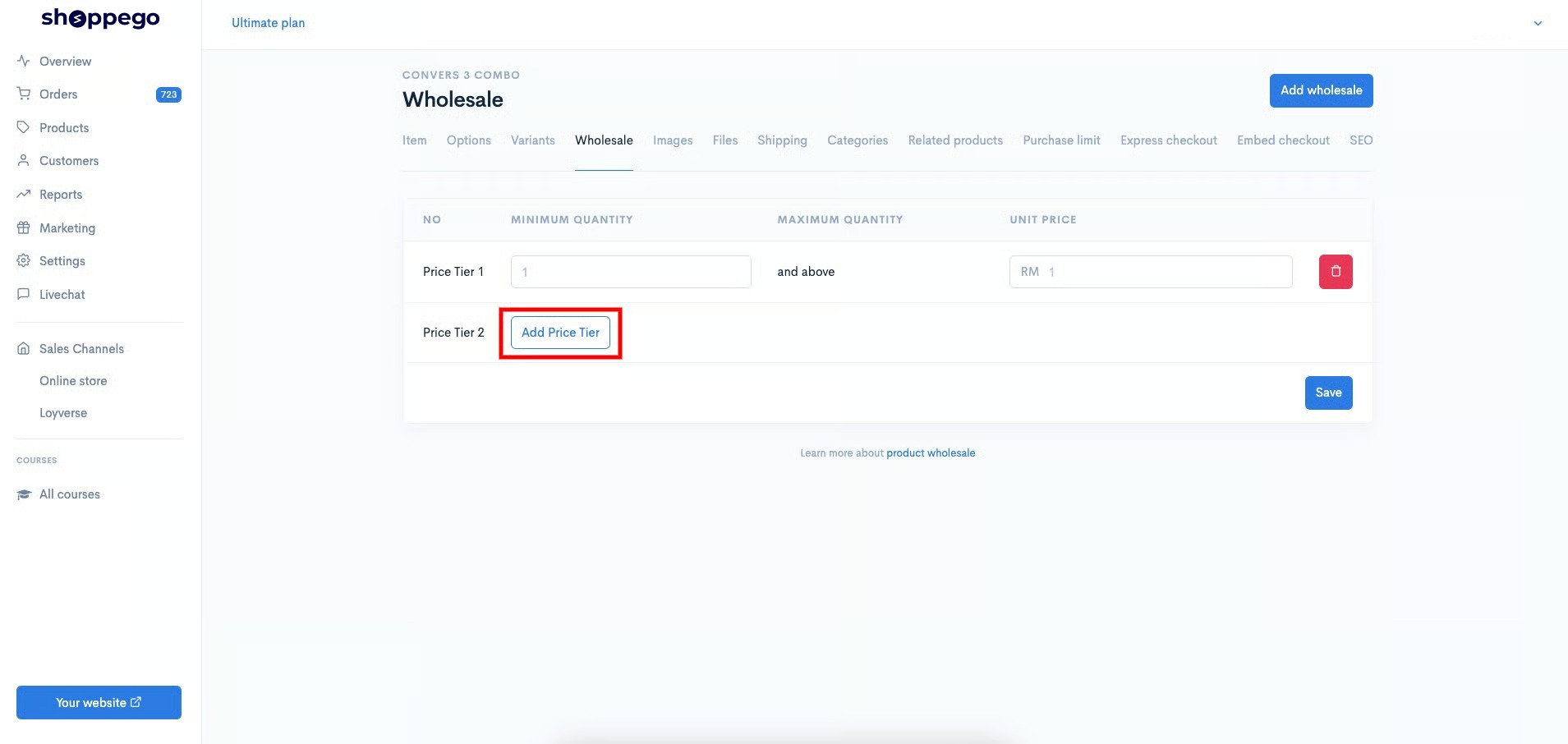
7. To add a price tier, you can click on the **Add Price Tier** button

<figure><img src="https://3359028955-files.gitbook.io/~/files/v0/b/gitbook-x-prod.appspot.com/o/spaces%2F-Lh09fNwqqta5Vj6Wr8p%2Fuploads%2Fgit-blob-d34e1dc4fa549e5d711eeb4e4b26f0dee9f5bff5%2F66uO8hCujUIpwF7GLLa6.jpg?alt=media" alt=""><figcaption></figcaption></figure>

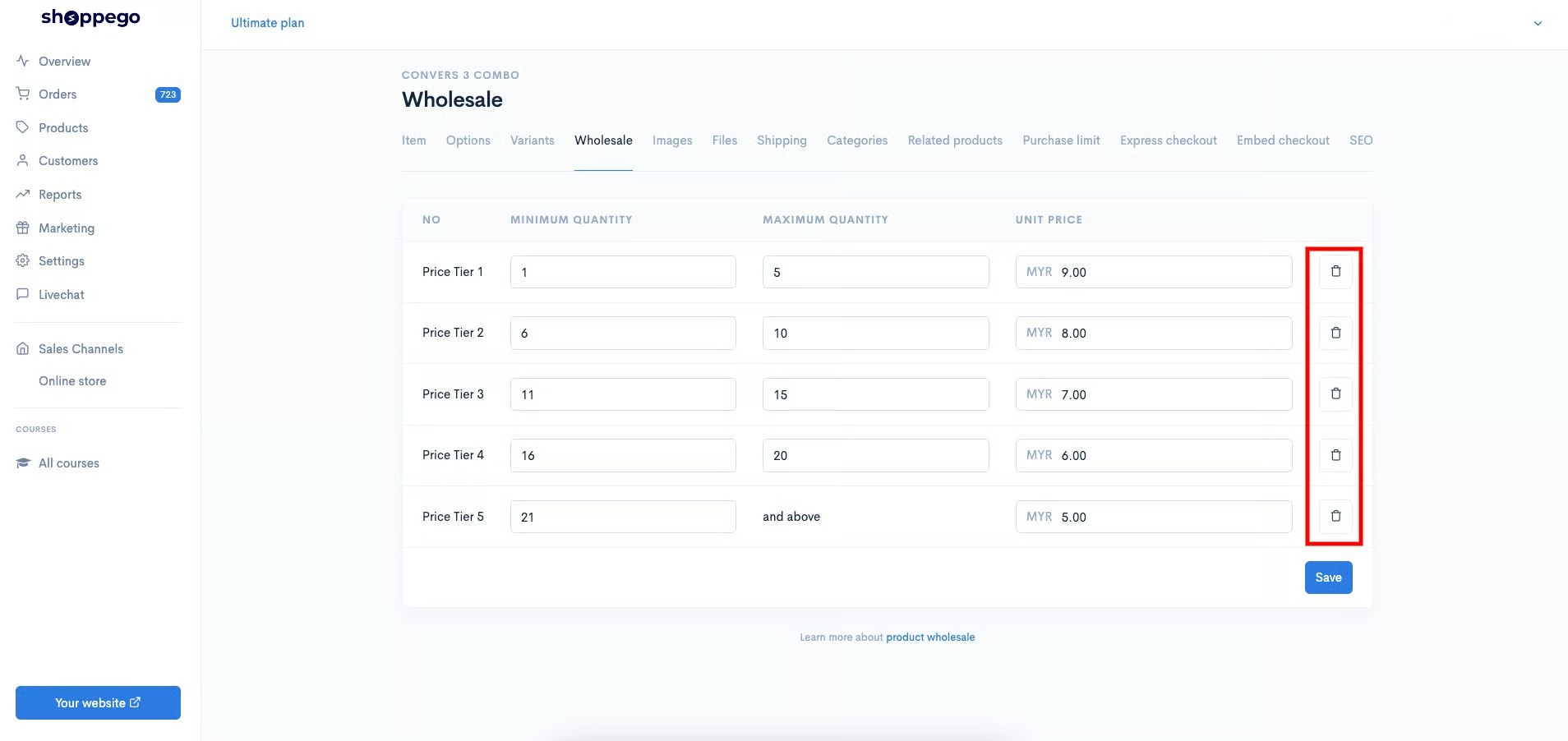
8. If you want to delete the price tier you have already created, you can click on the **trash can icon** **button.**

<figure><img src="https://3359028955-files.gitbook.io/~/files/v0/b/gitbook-x-prod.appspot.com/o/spaces%2F-Lh09fNwqqta5Vj6Wr8p%2Fuploads%2Fgit-blob-18e2412dfcf0c473e35ce374c2993d8d706aade6%2FfoDjr7Q7kAnOu4dRiCXj.jpg?alt=media" alt=""><figcaption></figcaption></figure>

9. Once the setting is done press the **Save** button

![](https://3359028955-files.gitbook.io/~/files/v0/b/gitbook-x-prod.appspot.com/o/spaces%2F-Lh09fNwqqta5Vj6Wr8p%2Fuploads%2Fgit-blob-ec8bd00d0ebd8340b681eeef850208385a80a049%2FVvrhF9PlZuoMpwvTMA3O.jpg?alt=media)

10. Once done, it means that the customer will automatically be able to buy the product at the price you set if the product purchase quantity is within the range you set.\
    \
    For **Hartamas**, **Solaris** and **Tampin themes**, this Wholesale table display will be visible in the product page itself.

![](https://3359028955-files.gitbook.io/~/files/v0/b/gitbook-x-prod.appspot.com/o/spaces%2F-Lh09fNwqqta5Vj6Wr8p%2Fuploads%2Fgit-blob-a9665fdbebe28f21ed7304737e915d12ff178330%2Fh5kMjLo3T850R6NDiYak.png?alt=media)