> For the complete documentation index, see [llms.txt](https://docs.shoppego.my/tutorials/llms.txt). Markdown versions of documentation pages are available by appending `.md` to page URLs; this page is available as [Markdown](https://docs.shoppego.my/tutorials/en/settings/shipping-carriers.md).

# Shipping Carriers

In Shoppego, you can set the shipping carrier that you use to facilitate the process of adding tracking URL for each order that you are ready for delivery.

### Setup <a href="#cara-penetapan" id="cara-penetapan"></a>

1\. Log in to your Shoppego Dashboard account

![](https://3359028955-files.gitbook.io/~/files/v0/b/gitbook-x-prod.appspot.com/o/spaces%2F-Lh09fNwqqta5Vj6Wr8p%2Fuploads%2Fgit-blob-b853fc0189b34fb1d3990f5b1f53fa71deb9d384%2FlCN7aw3FznaFFoOAyya2.jpg?alt=media)

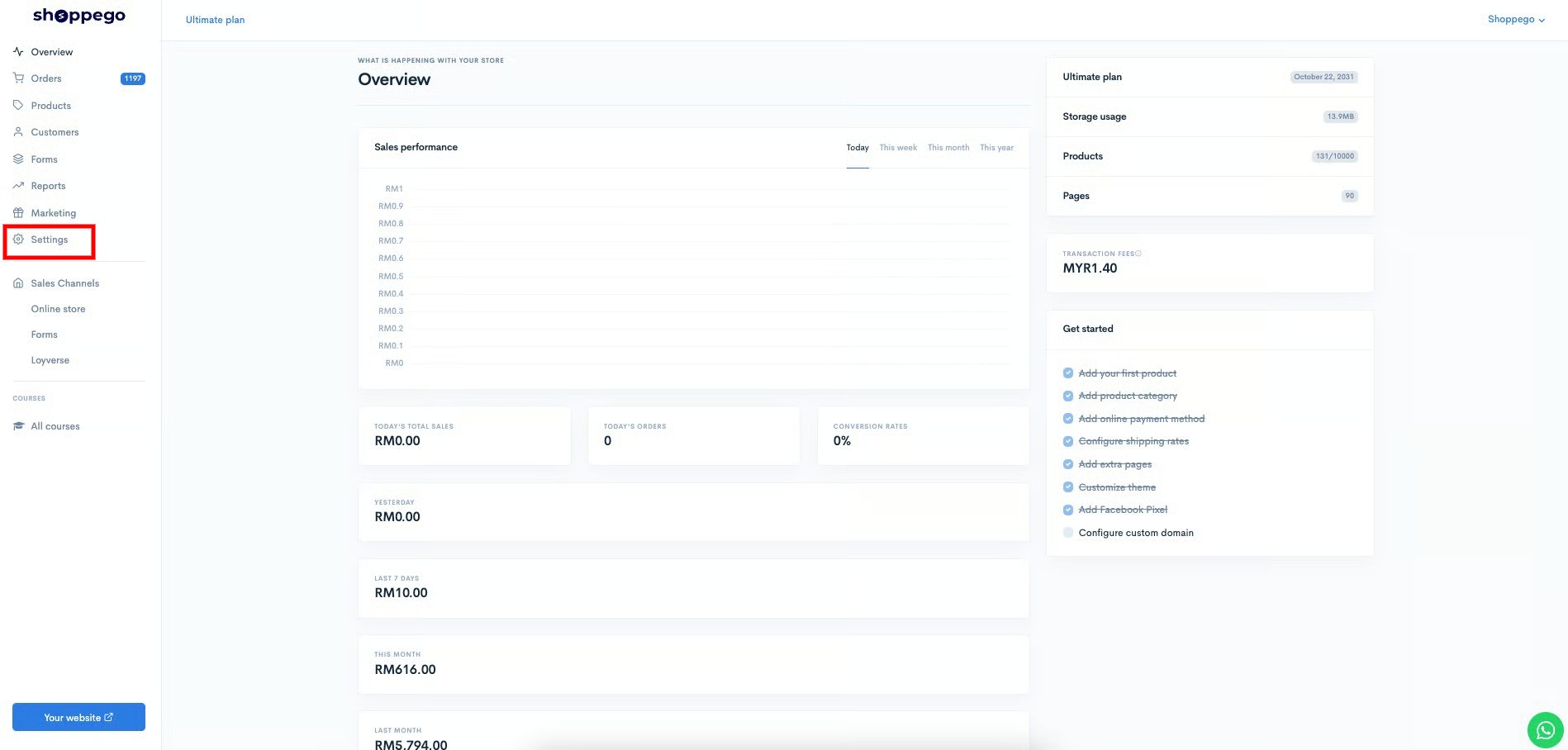
2\. Click on **Settings**

![](https://3359028955-files.gitbook.io/~/files/v0/b/gitbook-x-prod.appspot.com/o/spaces%2F-Lh09fNwqqta5Vj6Wr8p%2Fuploads%2Fgit-blob-9ae8b66b366958146673b78216b78ff0e8f12b90%2FVsK9zs6aZtUfKK1hcCiM.jpg?alt=media)

3\. Click on **Shipping carriers**

![](https://3359028955-files.gitbook.io/~/files/v0/b/gitbook-x-prod.appspot.com/o/spaces%2F-Lh09fNwqqta5Vj6Wr8p%2Fuploads%2Fgit-blob-a433cce6f3cf6555461b8e15f23635ba08552183%2F1mrmk0SMw460lVFhGFb0.jpg?alt=media)

4\. Click on **Add carrier**

![](https://3359028955-files.gitbook.io/~/files/v0/b/gitbook-x-prod.appspot.com/o/spaces%2F-Lh09fNwqqta5Vj6Wr8p%2Fuploads%2Fgit-blob-2fbbc7a240b81dc2e3eca5b41c4cb82cf87d26e5%2FM1SJNp2YbocpybEapTOi.jpg?alt=media)

5\. Next you will be asked to fill in the space provided as shown below.

![](https://3359028955-files.gitbook.io/~/files/v0/b/gitbook-x-prod.appspot.com/o/spaces%2F-Lh09fNwqqta5Vj6Wr8p%2Fuploads%2Fgit-blob-0dd486e8815d1a581a6af8c223dcff1037116d1f%2FRO9yUsxYR5qOMj14ipKu.jpg?alt=media)

<table data-header-hidden><thead><tr><th width="156"></th><th></th></tr></thead><tbody><tr><td><strong>Name</strong></td><td>Enter the name of your shipping carrier. For example, Poslaju and so on</td></tr><tr><td><strong>Tracking URL</strong></td><td>Enter a link for your customers to track their orders for the shipping carrier you use. You can get the link through your shipping carrier's website.</td></tr></tbody></table>

### Additional Information

For information on setting the Tracking URL, you can add the Custom variable that we have provided. For now, there is 1 custom variable that you can use in the Tracking URL:

| Custom Variable            | Explaination                                                                               |
| -------------------------- | ------------------------------------------------------------------------------------------ |
| **{{ tracking\_number }}** | The system will automatically enter the tracking number of the order in your tracking URL. |

6\. Once you enter the details you can click **Save**

![](https://3359028955-files.gitbook.io/~/files/v0/b/gitbook-x-prod.appspot.com/o/spaces%2F-Lh09fNwqqta5Vj6Wr8p%2Fuploads%2Fgit-blob-7a9deb77c53a3ae415e7e554b10e1bc3f4d2ec6e%2FvVsgPLuKbWovGwdmwmI9.jpg?alt=media)

Now your add carrier setup is successful.

![](https://3359028955-files.gitbook.io/~/files/v0/b/gitbook-x-prod.appspot.com/o/spaces%2F-Lh09fNwqqta5Vj6Wr8p%2Fuploads%2Fgit-blob-8bb1ee60b3197ee5bd81a8539cd0f2b8ced2f8fa%2F7f0KBDdpPICYEYx64eYK.jpg?alt=media)