> For the complete documentation index, see [llms.txt](https://docs.shoppego.my/tutorials/llms.txt). Markdown versions of documentation pages are available by appending `.md` to page URLs; this page is available as [Markdown](https://docs.shoppego.my/tutorials/en/settings/shipping/free-shipping/price-based-rates.md).

# Price Based Rates

## Setup Free Shipping Based on Price Based Rates

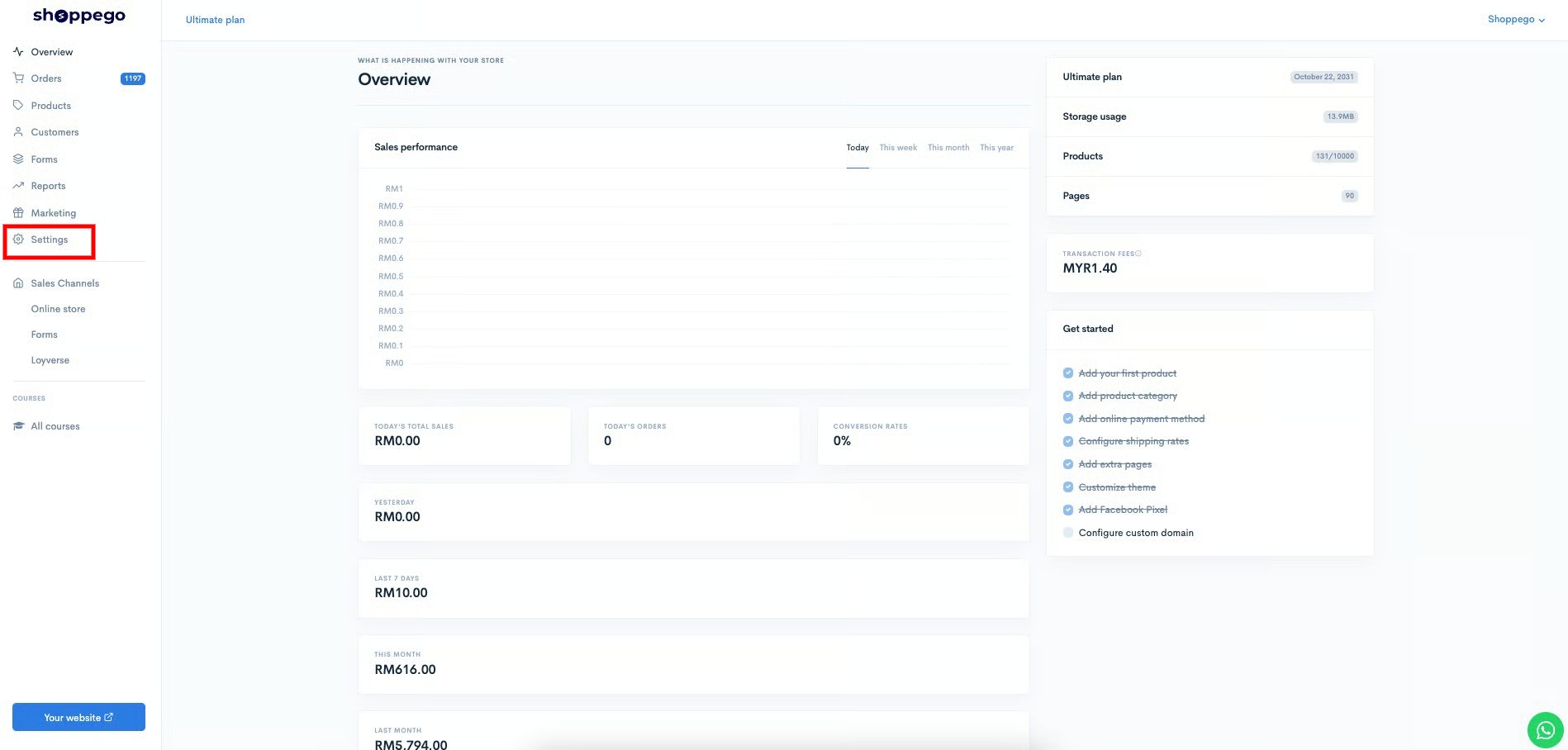
1\. Login to your Shoppego account.

![](https://3359028955-files.gitbook.io/~/files/v0/b/gitbook-x-prod.appspot.com/o/spaces%2F-Lh09fNwqqta5Vj6Wr8p%2Fuploads%2Fgit-blob-b853fc0189b34fb1d3990f5b1f53fa71deb9d384%2FlCN7aw3FznaFFoOAyya2.jpg?alt=media)

2\. Click on **Settings**

![](https://3359028955-files.gitbook.io/~/files/v0/b/gitbook-x-prod.appspot.com/o/spaces%2F-Lh09fNwqqta5Vj6Wr8p%2Fuploads%2Fgit-blob-9ae8b66b366958146673b78216b78ff0e8f12b90%2FVsK9zs6aZtUfKK1hcCiM.jpg?alt=media)

3\. Click on **Shipping**

![](https://3359028955-files.gitbook.io/~/files/v0/b/gitbook-x-prod.appspot.com/o/spaces%2F-Lh09fNwqqta5Vj6Wr8p%2Fuploads%2Fgit-blob-3c2c829c04820d4a9571b3dce8561872737f4e9b%2FcpHcQpRr3fHr8hcZX0RH.png?alt=media)

4\. Click the **Edit** Button in any zone where you want to apply this **Free Shipping** setting.

![](https://3359028955-files.gitbook.io/~/files/v0/b/gitbook-x-prod.appspot.com/o/spaces%2F-Lh09fNwqqta5Vj6Wr8p%2Fuploads%2Fgit-blob-25f3845d082720c373d19142218711b65f29f30f%2FuvsBSoqDZUVNlcVP5JFd.jpg?alt=media)

5\. Click on **Price based rates**

![](https://3359028955-files.gitbook.io/~/files/v0/b/gitbook-x-prod.appspot.com/o/spaces%2F-Lh09fNwqqta5Vj6Wr8p%2Fuploads%2Fgit-blob-202910b4b0d6b5eacd300905d1f079019f90b8df%2FxTW7tdfPKh4CiixKhUF2.jpg?alt=media)

6\. Click on the **Add rate** button

![](https://3359028955-files.gitbook.io/~/files/v0/b/gitbook-x-prod.appspot.com/o/spaces%2F-Lh09fNwqqta5Vj6Wr8p%2Fuploads%2Fgit-blob-559274de0396d8c29de86a23c7322d747fde5d20%2F2RSGtROtSCrwtArHKI1j.jpg?alt=media)

7\. A popup will appear as shown below.

![](https://3359028955-files.gitbook.io/~/files/v0/b/gitbook-x-prod.appspot.com/o/spaces%2F-Lh09fNwqqta5Vj6Wr8p%2Fuploads%2Fgit-blob-a7c4b6c700c3c8c7fffba45d90a10d3757e59de8%2F-MkeJ-kl3trSnx-wbaGq.jpg?alt=media)

8\. You can enter the details you want according to your promo. In part:

* **Name = Enter the name of your promotion**
* **Minimum order price = Enter the value that the customer needs to achieve to get the&#x20;**<mark style="color:red;">**Free Shipping**</mark>
* **Maximum order price = Enter a max value (100000)**
* **Price = Let the&#x20;**<mark style="color:red;">**value be 0.**</mark>

9\. Once done you can click the **Add** button and check the **Free Shipping** promotion that you have set earlier.

## Example

Upon completion, the display that will appear on your checkout section will be like the display below.

![](https://3359028955-files.gitbook.io/~/files/v0/b/gitbook-x-prod.appspot.com/o/spaces%2F-Lh09fNwqqta5Vj6Wr8p%2Fuploads%2Fgit-blob-5acac926dfdc848b5b6a18cc339f5e4a6a9bea21%2F-MkeJ_ulY-Ww63oAy2vy.jpg?alt=media)

## Additional Information

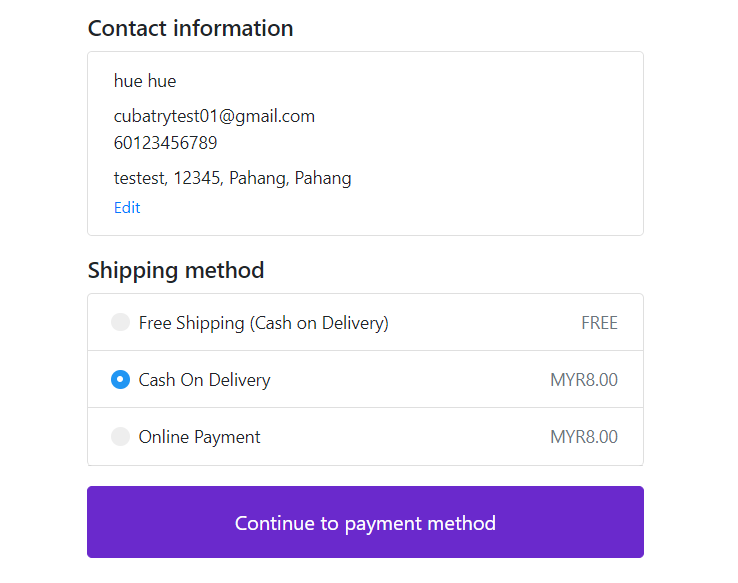
{% hint style="info" %} <mark style="color:red;">\*\*Attention\*\*</mark>: Make sure your setting on \*\*Price Based Rate\*\* is <mark style="color:red;">\*\*not the same\*\*</mark> as \*\*Weight Based Rate\*\* to \*\*avoid conflicting values\*\* in your Shipping Method Page as shown in the picture below.
{% endhint %}
<figure><img src="https://3359028955-files.gitbook.io/~/files/v0/b/gitbook-x-prod.appspot.com/o/spaces%2F-Lh09fNwqqta5Vj6Wr8p%2Fuploads%2Fgit-blob-76d6557c8b4f5aa3510c66a9664f66ab29c95921%2FLY3Ire5M6sl7wj43sohK.png?alt=media" alt=""><figcaption></figcaption></figure>