> For the complete documentation index, see [llms.txt](https://docs.shoppego.my/tutorials/llms.txt). Markdown versions of documentation pages are available by appending `.md` to page URLs; this page is available as [Markdown](https://docs.shoppego.my/tutorials/en/settings/webhook.md).

# Webhook

{% hint style="info" %}
Webhook can be used for you to automatically send messages via Telegram to yourself for you to be notified of recent purchases made by your customers.\
\
You can also use this webhook to send your customer's purchase information into your Google Excel and more.
{% endhint %}

{% hint style="success" %}
This Webhook function is only available on Standard, Premium and Ultimate plan subscriptions.
{% endhint %}

### Webhooks Setup

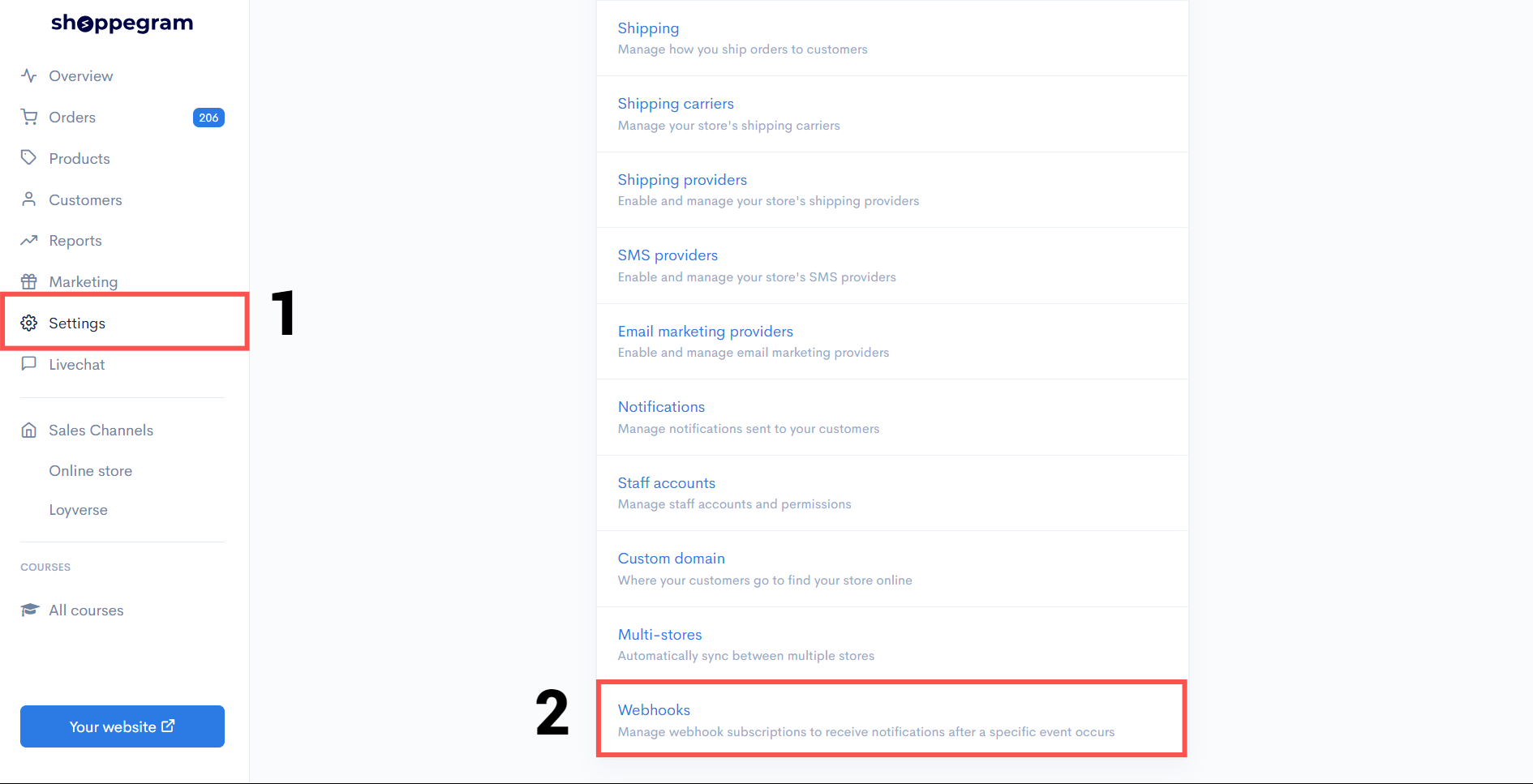
1. Click on **Settings (1)** and scroll down until you find the **Webhooks section (2)**.

<figure><img src="https://3359028955-files.gitbook.io/~/files/v0/b/gitbook-x-prod.appspot.com/o/spaces%2F-Lh09fNwqqta5Vj6Wr8p%2Fuploads%2Fgit-blob-2a249bca370b49c58c0721708eda9aeb356d41f7%2FsfExfBgeGdHDI80Z21tz.png?alt=media" alt=""><figcaption></figcaption></figure>

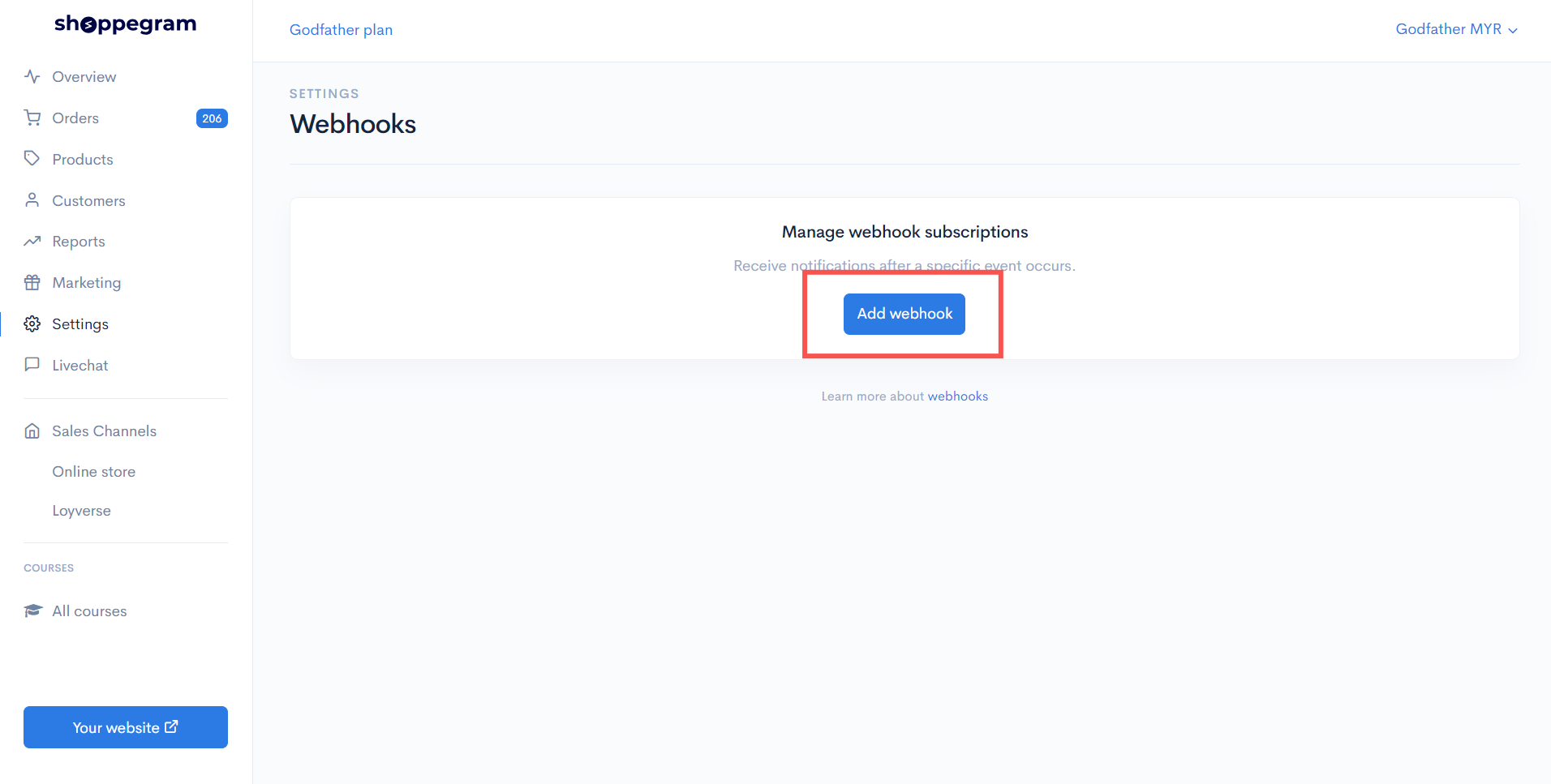
2. Press the **Add Webhook** button to add your webhook.

<figure><img src="https://3359028955-files.gitbook.io/~/files/v0/b/gitbook-x-prod.appspot.com/o/spaces%2F-Lh09fNwqqta5Vj6Wr8p%2Fuploads%2Fgit-blob-30baaee1b538bf537324a50c90d6cdee3e0bae27%2FLRqPRQ3SfvyX0EanSi4Y.png?alt=media" alt=""><figcaption></figcaption></figure>

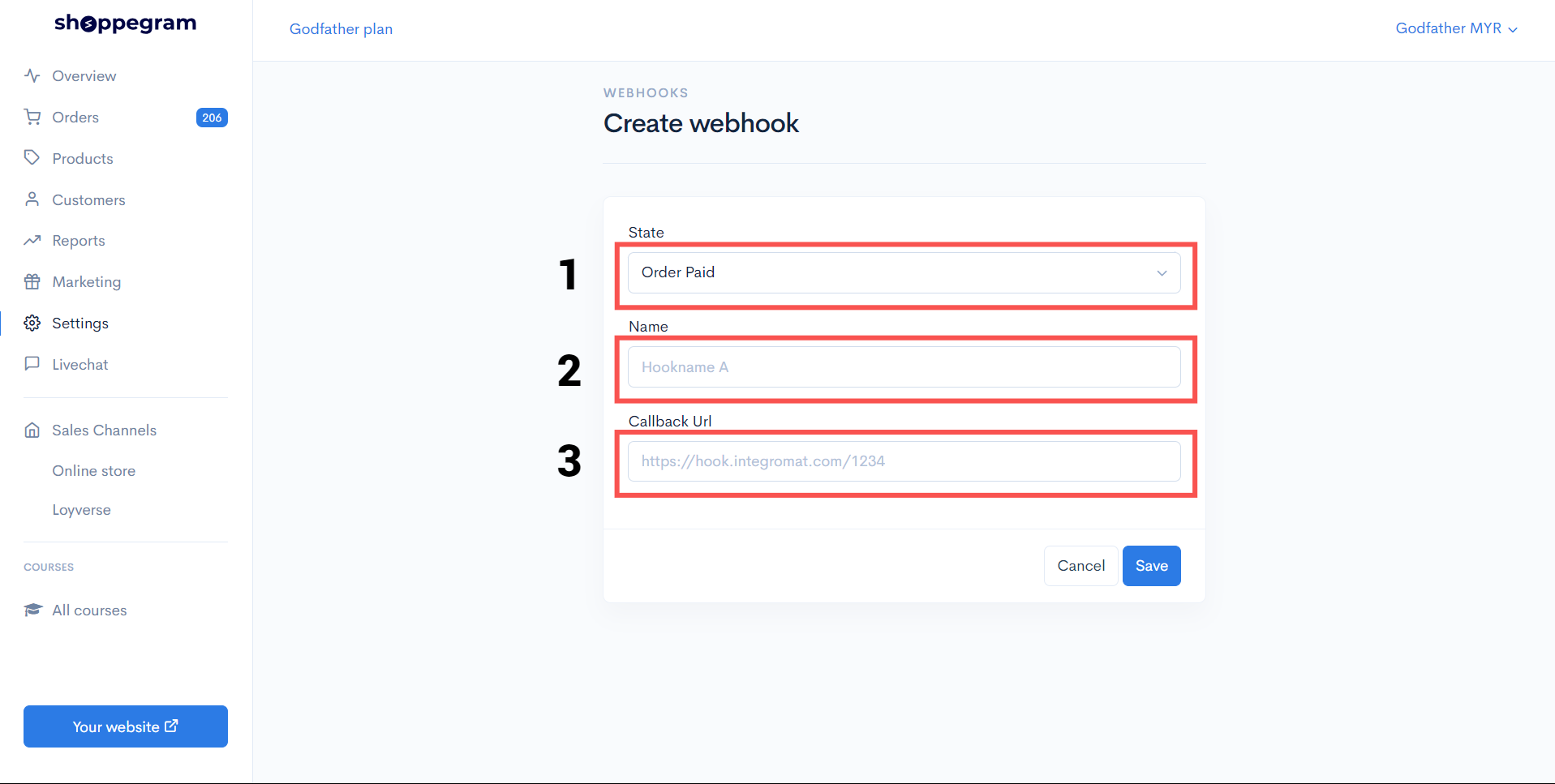
3. Select **Webhook Status (1)**, then enter the name you want to assign in the **Name field (2)** and enter the webhook link in the **Callback URL field (3)**.

<figure><img src="https://3359028955-files.gitbook.io/~/files/v0/b/gitbook-x-prod.appspot.com/o/spaces%2F-Lh09fNwqqta5Vj6Wr8p%2Fuploads%2Fgit-blob-cc89ce2584bdeffb9183b5cef51a22b56d52b5bc%2FhNpGcangUWPtNjJbxSDq.png?alt=media" alt=""><figcaption></figcaption></figure>

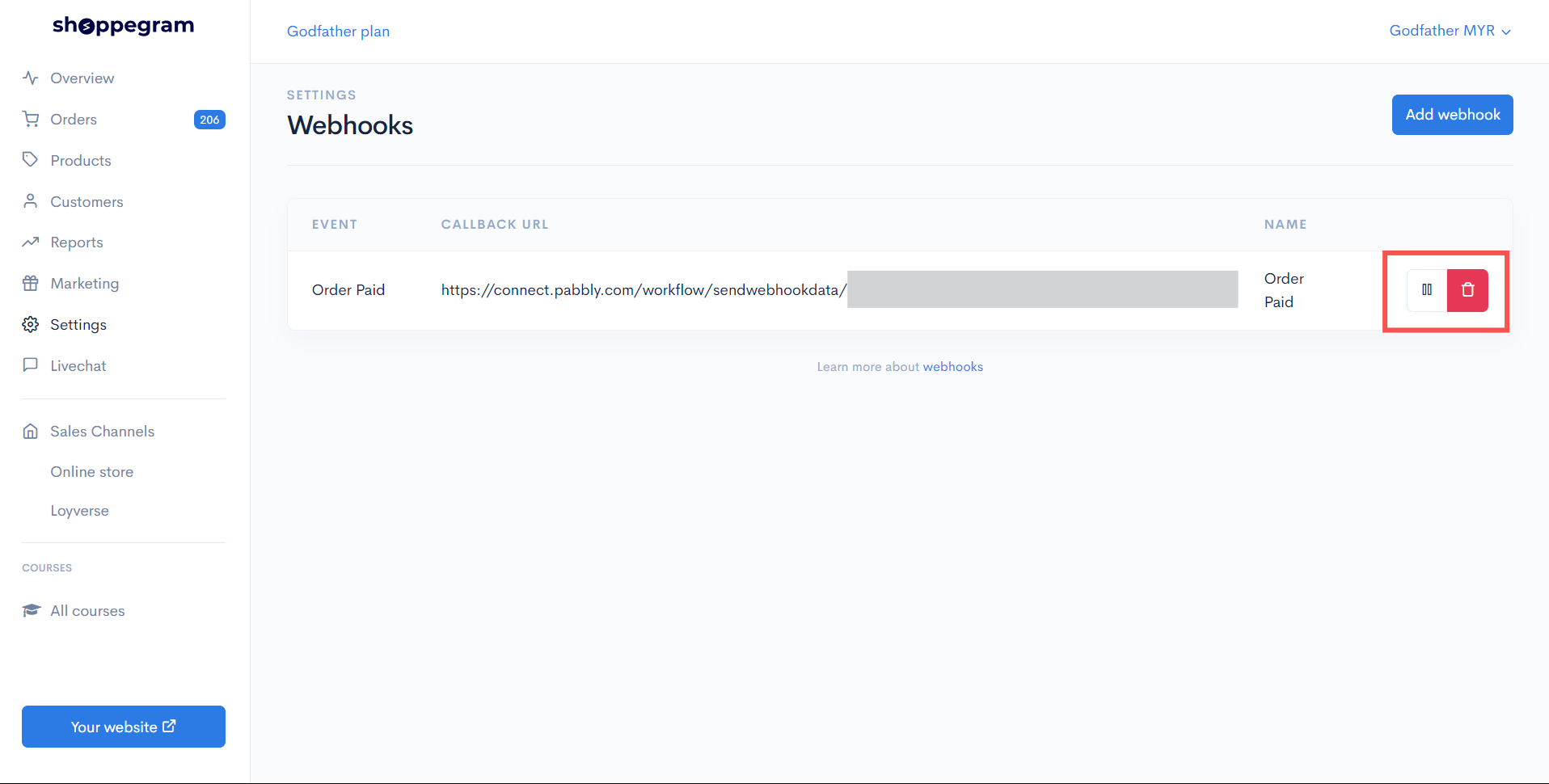
4. Press the **'||'** icon to stop receiving data from your webhook and press it again to resume receiving data from the webhook. Press the **trash can icon** to delete the webhook.

<figure><img src="https://3359028955-files.gitbook.io/~/files/v0/b/gitbook-x-prod.appspot.com/o/spaces%2F-Lh09fNwqqta5Vj6Wr8p%2Fuploads%2Fgit-blob-9402ea394e6df7ac02bfb6349387bae924c03180%2FDVCOutMpefEIccjE4NRm.png?alt=media" alt=""><figcaption></figcaption></figure>

### Webhook Data

In Commerce, you can use the webhook to pull data for each:

<table data-header-hidden><thead><tr><th width="243">State</th><th>Descriptions</th></tr></thead><tbody><tr><td><strong>Order Paid</strong></td><td>Trigger when you mark your order as paid or the customer's order successfully makes a payment</td></tr><tr><td><strong>Order Shipped</strong></td><td>Trigger when you enter the tracking number on the customer's order</td></tr><tr><td><strong>Checkout Abandoned</strong></td><td>Trigger when a customer does not complete payment within 60 minutes</td></tr><tr><td><strong>Checkout Completed</strong></td><td>Trigger when the customer successfully checkout and reaches up to the thank you page</td></tr><tr><td><strong>Checkout Updated</strong></td><td>Trigger when customers receive the Thank you Page Offer (TYPO) promotion you offer</td></tr><tr><td><strong>Order Status Processing</strong></td><td>Trigger when you change the status of a customer's order to Processing</td></tr><tr><td><strong>Order Status Completed</strong></td><td>Trigger when you change the status of a customer's order to Completed</td></tr><tr><td><strong>Order Updated</strong></td><td>Triggered when the <strong>order is updated</strong> after the customer accepts the Thank You Page Offer (TYPO).</td></tr><tr><td><strong>Order Ready For Pickup</strong></td><td>Trigger when you change the customer's order status to "<strong>Ready for Pickup</strong>".</td></tr><tr><td><strong>Order Packed</strong></td><td>Trigger when you change the customer's order status to '<strong>Order Packed</strong>'.</td></tr><tr><td><strong>Inventory Updated</strong></td><td>Trigger when there is a <strong>change in your product stock</strong> quantity.</td></tr></tbody></table>

Here, we include the values ​​that you can pull.

| <p><strong>Parameters</strong>: {{ checkout}}<br><strong>Description</strong>: Checkout data<br><strong>Example</strong>: \[Collection]</p>                                                                                                                               |
| ------------------------------------------------------------------------------------------------------------------------------------------------------------------------------------------------------------------------------------------------------------------------- |
| <p><strong>Parameters</strong>: {{ checkout.id}}<br><strong>Description</strong>: Id for checkout data<br><strong>Example</strong>: 1262140</p>                                                                                                                           |
| <p><strong>Parameters</strong>: {{ checkout.domain}}<br><strong>Description</strong>: Domain/Subdomain of your store<br><strong>Example</strong>: mirfaith.myshoppegram.com</p>                                                                                           |
| <p><strong>Parameters</strong>: {{ checkout.url}}<br><strong>Description</strong>: Your store link<br><strong>Example</strong>: <a href="https://mirfaith.myshoppegram.com"><https://mirfaith.myshoppegram.com></a></p>                                                   |
| <p><strong>Parameters</strong>: {{ checkout.currency}}<br><strong>Description</strong>: Currency used in your store<br><strong>Example</strong>: MYR</p>                                                                                                                  |
| <p><strong>Parameters</strong>: {{ checkout.total}}<br><strong>Description</strong>: The amount of payment charged<br><strong>Example</strong>: 10</p>                                                                                                                    |
| <p><strong>Parameters</strong>: {{ checkout.shipping}}<br><strong>Description</strong>: The shipping rates you have set<br><strong>Example</strong>: 0</p>                                                                                                                |
| <p><strong>Parameters</strong>: {{ checkout.rate}}<br><strong>Description</strong>: The name of the shipping rates that the customer has chosen<br><strong>Example</strong>: FREE SHIPPING COD</p>                                                                        |
| <p><strong>Parameters</strong>: {{ checkout.completed\_at}}<br><strong>Description</strong>: The date and time the customer successfully made the payment<br><strong>Example</strong>: 2021-03-03T22:58:32+08:00</p>                                                      |
| <p><strong>Parameters</strong>: {{ checkout.created\_at}}<br><strong>Description</strong>: The date and time the customer wants to make the payment<br><strong>Example</strong>: 2021-03-03T22:58:17+08:00</p>                                                            |
| <p><strong>Parameters</strong>: {{ checkout.items}}<br><strong>Description</strong>: Data items/variants in checkout<br><strong>Example</strong>: \[Collection]</p>                                                                                                       |
| <p><strong>Parameters</strong>: {{ checkout.items\[].product}}<br><strong>Description</strong>: Product data at checkout<br><strong>Example</strong>: \[Collection]</p>                                                                                                   |
| <p><strong>Parameters</strong>: {{ checkout.items\[].product.name}}<br><strong>Description</strong>: The name of your product<br><strong>Example</strong>: Test</p>                                                                                                       |
| <p><strong>Parameters</strong>: {{ checkout.items\[].product.sku}}<br><strong>Description</strong>: SKUs for your product variants<br><strong>Example</strong>: 123456</p>                                                                                                |
| <p><strong>Parameters</strong>: {{ checkout.items\[].name}}<br><strong>Description</strong>: The name of your product variant<br><strong>Example</strong>: 2 Unit/ Hitam</p>                                                                                              |
| <p><strong>Parameters</strong>: {{ checkout.items\[].currency}}<br><strong>Description</strong>: Currency used in your store<br><strong>Example</strong>: MYR</p>                                                                                                         |
| <p><strong>Parameters</strong>: {{ checkout.items\[].price}}<br><strong>Description</strong>: The price of your product variants<br><strong>Example</strong>: 10</p>                                                                                                      |
| <p><strong>Parameters</strong>: {{ checkout.items\[].quantity}}<br><strong>Description</strong>: The quantity of your variant product that is at Checkout<br><strong>Example</strong>: 1</p>                                                                              |
| <p><strong>Parameters</strong>: {{ checkout.items\[].subtotal}}<br><strong>Description</strong>: The total price of the variant product at Checkout<br><strong>Example</strong>: 10</p>                                                                                   |
| <p><strong>Parameters</strong>: {{ checkout.customer}}<br><strong>Description</strong>: Customer data that checkout on your website<br><strong>Example</strong>: \[Collection]</p>                                                                                        |
| <p><strong>Parameters</strong>: {{ checkout.customer.first\_name}}<br><strong>Description</strong>: The first name of the customer who checked out on your website<br><strong>Example</strong>: Abu</p>                                                                   |
| <p><strong>Parameters</strong>: {{ checkout.customer.last\_name}}<br><strong>Description</strong>: The last name of the customer who checked out on your website<br><strong>Example</strong>: Ali</p>                                                                     |
| <p><strong>Parameters</strong>: {{ checkout.customer.phone}}<br><strong>Description</strong>: The phone number of the customer who checked out on your website<br><strong>Example</strong>: 60123456789</p>                                                               |
| <p><strong>Parameters</strong>: {{ checkout.customer.email}}<br><strong>Description</strong>: Email customers who checkout on your website<br><strong>Example</strong>: <a href="mailto:abuali@gmail.com"><abuali@gmail.com></a></p>                                      |
| <p><strong>Parameters</strong>: {{ checkout.shipping\_address}}<br><strong>Description</strong>: Shipping data entered during checkout on your website<br><strong>Example</strong>: \[Collection]</p>                                                                     |
| <p><strong>Parameters</strong>: {{ checkout.shipping\_address.first\_name}}<br><strong>Description</strong>: The first name entered on the shipping page during checkout on your website<br><strong>Example</strong>: Nur</p>                                             |
| <p><strong>Parameters</strong>: {{ checkout.shipping\_address.last\_name}}<br><strong>Description</strong>: The last name entered on the shipping page during checkout on your website<br><strong>Example</strong>: Aishah</p>                                            |
| <p><strong>Parameters</strong>: {{ checkout.shipping\_address.phone}}<br><strong>Description</strong>: Phone number entered on the shipping page during checkout on your website<br><strong>Example</strong>: 601122334455</p>                                            |
| <p><strong>Parameters</strong>: {{ checkout.shipping\_address.email}}<br><strong>Description</strong>: Email entered on the shipping page during checkout on your website<br><strong>Example</strong>: <a href="mailto:nuraishah@gmail.com"><nuraishah@gmail.com></a></p> |
| <p><strong>Parameters</strong>: {{ checkout.shipping\_address.address1}}<br><strong>Description</strong>: Address entered on the shipping page during checkout on your website<br><strong>Example</strong>: Persiaran Permata Perdana</p>                                 |
| <p><strong>Parameters</strong>: {{ checkout.shipping\_address.address2}}<br><strong>Description</strong>: Address line 2 (If any) entered on the shipping page during checkout on your website</p><p><strong>Example</strong>: -</p>                                      |
| <p><strong>Parameters</strong>: {{ checkout.shipping\_address.zip}}<br><strong>Description</strong>: Postal code entered on the shipping page during checkout on your website<br><strong>Example</strong>: 63000</p>                                                      |
| <p><strong>Parameters</strong>: {{ checkout.shipping\_address.city}}<br><strong>Description</strong>: The city entered in the shipping page during checkout on your website<br><strong>Example</strong>: Selangor</p>                                                     |
| <p><strong>Parameters</strong>: {{ checkout.shipping\_address.state}}<br><strong>Description</strong>: The state entered in the shipping page during checkout on your website<br><strong>Example</strong>: Cyberjaya</p>                                                  |
